

If you have ever logged into your bank account online, managed a project in Trello, or used Gmail, you have used a web application. But if someone asked you to explain exactly what a web application is and how it differs from a regular website, you would probably find it harder to answer than you expected.
That confusion is completely understandable, and it matters more than most people realize. Understanding what a web application is, what it can do, and when your business actually needs one is the foundation for making good decisions about software investment.
At Enovatorz, we build web applications for businesses across the Globe. We have this conversation regularly with founders, operations directors, and CTOs who know they need something built but are not entirely sure what they are asking for. This guide gives you the clear, jargon-free answer.
What is a Web Application? The Simple Definition
A web application is software that runs on a web server and is accessed through a browser. Unlike a desktop application that you install on your computer, or a mobile app that you download from an app store, a web application exists online and requires no installation. You access it through a URL, just like a website.
But a web application is fundamentally different from a website in one critical way: its purpose.
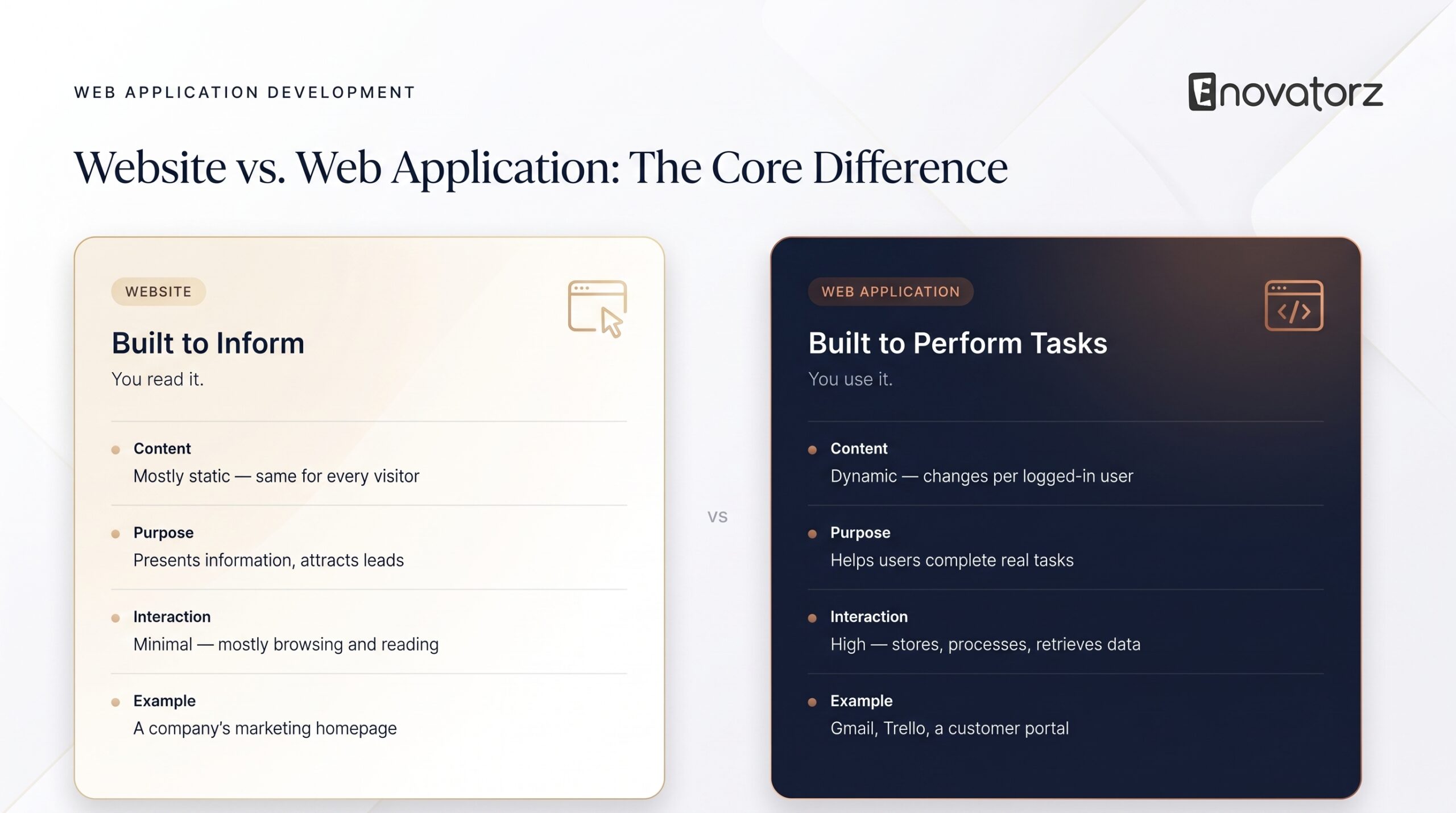
A website is primarily informational. It presents content for you to read and consume. A web application is built for interaction. It is a tool that lets you perform specific tasks, manipulate data, and produce outcomes.
According to real 2026 research on this distinction: you read a website, but you use a web application. That single sentence captures the difference more cleanly than any technical explanation.
Gmail is a web application because you use it to compose, send, receive, and organize email. The email provider’s marketing website is a website because you read it to learn about the product. Both are accessed through a browser, but they serve completely different purposes.
Web Application vs Website: A Clear Comparison
Many modern businesses have both, and understanding which is which helps you communicate clearly about what you need built.
A website is typically static or mostly static. Its content does not change based on who is viewing it or what they have done previously. It presents the same information to all visitors. Its main goal is to inform, attract, and convert visitors into leads or customers.
A web application is dynamic. Its content changes based on the logged-in user, their history, their permissions, and their actions. It stores, processes, and retrieves data. Its main goal is to help users accomplish tasks.
Your company’s marketing site is a website. Your company’s customer portal where clients submit requests, track progress, and download documents is a web application. The distinction matters when you are planning what to build, because websites and web applications require fundamentally different architecture and development approaches.
The Main Types of Web Applications
Web applications come in several distinct forms, and knowing which type fits your need is the first step toward scoping a build accurately.
Single Page Applications
A single page application, or SPA, loads one HTML document and then dynamically updates content as the user interacts with it, without reloading the page. This creates a fast, app-like experience in the browser.
Google Maps is the classic example. As you drag the map or search for a location, the page does not reload. Content updates in place, creating a smooth, responsive experience. React, Angular, and Vue.js are the most common frameworks for building SPAs, all of which are part of the tech stack we use across our web application development projects.
Multi-Page Applications
A multi-page application reloads the full page each time the user navigates to a new section. This is the more traditional approach and still works well for applications where content depth matters more than seamless transitions, such as e-commerce platforms and content-heavy portals.
Progressive Web Applications
A progressive web app, or PWA, is a web application built with modern technologies that gives it characteristics traditionally associated with native mobile apps. PWAs can work offline, send push notifications, be installed on a device’s home screen, and load instantly even on slow connections.
PWAs are growing rapidly in 2026 as businesses look for app-like experiences without the cost and delay of submitting to app stores. If you are weighing whether to build a native app or a web solution, a PWA is often the answer that eliminates the either/or decision entirely.
SaaS Applications
Software as a Service, or SaaS, is a web application delivered to multiple customers over the internet on a subscription basis. The same application serves many different companies, each in their own isolated environment, which is called multi-tenancy.
If you are building a product to sell to other businesses, you are building a SaaS application. The architecture is more complex than a single-company application because it needs to handle multiple customers, subscription billing, role-based access across organizations, and data isolation between tenants.
Enterprise Web Applications
Enterprise web applications are large-scale internal tools built for specific business operations. ERPs (Enterprise Resource Planning systems), CRMs (Customer Relationship Management systems), HR management platforms, and operations dashboards all fall in this category.
These applications often need to integrate with existing enterprise systems, handle large volumes of data, and meet strict security and compliance requirements. Our HRM and business management software is a strong example of this type of application, built specifically for the operational needs of e-commerce businesses — combining HR management, order tracking, and performance analytics in one centralized dashboard.
E-commerce Web Applications
E-commerce web applications go beyond standard online stores by adding custom logic, integrations, and workflows that off-the-shelf platforms cannot support. Custom inventory management, specialized pricing engines, B2B ordering portals, and marketplace applications are all examples of e-commerce web applications that require custom development.
Real Examples of Web Applications
Understanding web applications through real examples makes the concept concrete.
- Gmail — Web-based email client. Stores, retrieves, and displays your emails based on your account. Lets you compose, send, label, search, and organize. This is a web application.
- Trello — Project management tool. Lets teams create boards, add cards, assign tasks, track progress, and collaborate in real time. This is a web application.
- Salesforce — CRM platform. Stores customer data, tracks sales pipelines, generates reports, and connects sales, marketing, and support teams. This is an enterprise web application.
- Shopify — E-commerce platform. Lets store owners manage products, process orders, handle payments, and run their entire online retail operation. This is a SaaS web application.
- A hospital patient portal — Lets patients view test results, book appointments, message their doctor, and access their medical history. This is an enterprise web application with strict compliance requirements.
Each of these is fundamentally different from a marketing website, even though all of them are accessed through a browser.
Business-Specific Web Applications You Might Actually Need
Beyond the well-known examples above, many growing businesses need custom web applications built around their own specific operations. Here are some of the most common types we build at Enovatorz — and the problems each one solves.
Human Resource Management System (HRMS) — Manages your entire employee lifecycle in one place. Handles recruitment, onboarding, attendance, leave tracking, payroll, performance reviews, and offboarding. Instead of juggling spreadsheets and separate HR tools, your HR team works from a single platform designed around your company’s specific policies and structure. Our HRM and business management software is a real example of this type of application built and deployed for live businesses.
Warehouse Management System (WMS) — Tracks every item that enters, moves through, and leaves your warehouse in real time. Manages bin locations, picking and packing workflows, receiving and dispatch, and stock movement history. A WMS eliminates the paper-based and spreadsheet-driven warehouse operations that slow down growing businesses and cause costly errors in fulfilment.
Order Management System (OMS) — Centralizes all your orders from every sales channel — your website, marketplaces like Amazon, wholesale portals, and physical locations — into one dashboard. Routes orders to the right fulfilment location, tracks status in real time, and automates the communication that keeps customers informed. Businesses selling across multiple channels and regions find an OMS essential once volume grows beyond what manual processing can handle. This connects directly with the Amazon account management workflows we support for e-commerce clients operating at scale.
Inventory Management System (IMS) — Tracks stock levels across every location in real time, triggers reorder alerts before you run out, and gives you accurate visibility into what you have, where it is, and what it is worth. An IMS eliminates overselling, reduces dead stock, and gives your buying team the data they need to make better purchasing decisions. For businesses managing large or complex product catalogues, accurate real-time inventory data is the difference between smooth operations and constant firefighting.
Customer Portal — A dedicated login area where your clients can submit requests, track project or order status, access their documents and reports, and communicate with your team without going through email chains. Customer portals reduce support workload, improve client satisfaction, and give your business a professional, organized front end that scales with your client base.
Supplier or Vendor Portal — A web application where your suppliers submit invoices, update delivery information, respond to purchase orders, and manage their relationship with your business digitally. Replacing email-based supplier communication with a structured portal significantly reduces administrative overhead and errors in procurement workflows.
If any of these sound like a problem your business is currently solving with spreadsheets, email threads, or a combination of tools that do not talk to each other, that is the clearest signal that a custom web application would deliver real operational value. Our web application development team works with businesses across industries to scope, design, and build exactly these kinds of systems.
What Makes a Web Application Work: The Key Components
Understanding the basic anatomy of a web application helps you communicate more effectively with developers and evaluate proposals more critically.
- The frontend is everything the user sees and interacts with in the browser. It is built with HTML, CSS, and JavaScript, often using frameworks like React, Angular, or Vue.js. The frontend is responsible for layout, visual design, and user interactions.
- The backend is the server-side logic that processes requests, applies business rules, manages data, and sends responses back to the frontend. It is built with languages like Node.js, Python, Java, or PHP. The backend is where your application’s intelligence lives.
- The database stores all the persistent data your application needs — user accounts, transaction records, content, configurations, and everything else that needs to be remembered between sessions. Common databases include MySQL, PostgreSQL, and MongoDB.
- APIs (Application Programming Interfaces) allow different systems to communicate with each other. Your web application might use APIs to connect to payment processors, third-party data sources, existing business systems, or mobile applications.
- Cloud infrastructure hosts all of these components and makes them accessible through the internet. AWS, Azure, and Google Cloud are the major platforms, each offering different services suited to different application types and scales.
When Does Your Business Need a Custom Web Application?
This is the most practically important question for business owners, and it deserves a direct answer.
You need a custom web application when your operational workflow is genuinely unique and no existing software matches it closely enough. When you are spending significant time on manual workarounds because your tools do not talk to each other. When you are building a product to sell to other businesses. When data security or compliance requirements rule out storing your data in a third-party SaaS tool. When the combination of multiple off-the-shelf tools has become too complex and expensive to maintain.
A particularly common example we see at Enovatorz is e-commerce businesses operating across multiple regions whose Amazon seller operations have grown beyond what standard tools can manage. In those cases, a custom web application that integrates with their Amazon account management workflows — tracking listings, PPC campaigns, inventory, and account health across markets in one place — solves problems that no off-the-shelf product adequately addresses.
You probably do not need a custom web application when a standard SaaS tool covers your needs adequately and you can adapt your process to fit it. When your budget is below the minimum threshold for quality custom development. When your requirements are likely to change significantly in the next six to twelve months.
Understanding what is content marketing and how it supports software businesses helps clarify why so many SaaS companies invest heavily in educational content around questions exactly like this one. The businesses that explain concepts clearly earn the trust of buyers who later become customers.
How Web Applications Are Built in 2026
Modern web application development follows an agile process rather than the traditional waterfall approach where everything is designed upfront and built in sequence.
In an agile process, development happens in short sprints of one to two weeks. At the end of each sprint, working software is delivered and reviewed. Requirements are validated and refined as the project progresses rather than being locked in at the start.
This approach matters because it keeps development aligned with business reality, which changes. A six-month project built entirely to a specification written in month one often does not match what the business actually needs by month six. Agile development builds in the ability to respond to what you learn.
At Enovatorz, our six-step development process follows this approach: discovery and planning, UI/UX design, development, testing and quality assurance, deployment, and ongoing support. Requirements are defined before design begins, and design is completed before development starts — but each phase informs the next and the client is involved throughout.
Security in Web Applications: What to Know Before You Build
Security is not something to think about after your application is built. It needs to be part of the architecture from the first planning conversation.
The most common web application vulnerabilities are well documented by OWASP, the Open Web Application Security Project, which publishes a regularly updated list of the top ten web application security risks. These include SQL injection, broken authentication, sensitive data exposure, and cross-site scripting.
For applications handling personal data, data protection regulations vary by region — GDPR in Europe, HIPAA in the United States, PDPA in Southeast Asia, and similar frameworks elsewhere. Regardless of where your business operates, data compliance requires specific data handling, storage, and deletion capabilities built into the architecture from the start. Any serious web application handling user data needs to meet the compliance standards of every region it serves.
These requirements are not expensive add-ons. They are baseline architectural decisions that cost far more to retrofit after launch than to build correctly from the start. At Enovatorz, security is built into every sprint from day one across all of our web application development projects, not added as a final checklist item before launch.
Does a web application need to be installed?
No. Web applications run in the browser and require no installation. You access them through a URL, the same way you access a website. This is one of their major advantages over desktop applications, which require installation on each device.
What is the difference between a web application and a mobile app?
A mobile app is installed on a device through an app store and runs natively on that device's operating system. A web application runs in the browser and is accessed through a URL. Progressive web apps (PWAs) blur this line by giving web applications many of the characteristics of mobile apps, including offline access and home screen installation.
How long does it take to build a web application?
Simple web applications with limited functionality typically take eight to sixteen weeks. Mid-range applications with multiple user types and integrations take sixteen to thirty-two weeks. Complex SaaS platforms and enterprise applications can take six to twelve months or more depending on scope.
How much does a web application cost to build?
Costs range from around $10,000 for simple internal tools to over $200,000 for enterprise-grade platforms. The primary drivers of cost are complexity, number of integrations, security and compliance requirements, and the volume of users the system needs to support.
Can I build a web application without coding?
No-code and low-code tools make it possible to build simple web applications without writing code, but they have significant limitations in terms of customization, scalability, and data complexity. For applications that need to handle real business complexity, custom development on a proper tech stack is almost always the right answer.
